Viwinco Windows and Patio Doors are backed by our industry-leading warranty. Warranty claims can now be submitted through our online warranty claims portal. Follow the steps below or watch our video tutorial to ensure your warranty claim is properly submitted.
Warranty Claim Submission Process
Step 1: Locate your Viwinco Warranty Label
Begin by finding the warranty label on your Viwinco window or door. This label contains crucial information such as the order number, manufacturing date, product line, product style, measurements, and the distributor code, which identifies where the window was purchased. Labels are typically found on the frame, sash, or jamb of the window. You may need to open the window or lift the glazing bead to view the label!
The diagram below indicates where to find the label based on your window style.
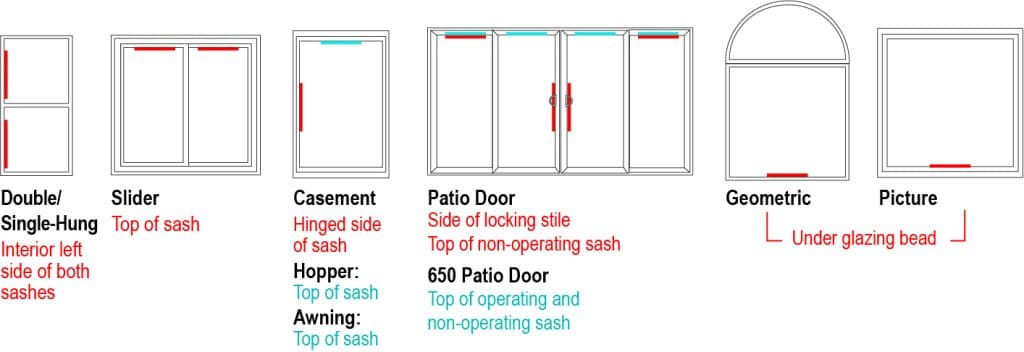
Note: If the warranty label is missing, cannot be accessed or cannot be located, any window from the same order will have the same order number. If you are unable to find the warranty label, please contact customer service at 800-927-2848.
Please do not confuse the warranty label with the gold AAMA label—they are similar in shape and size, but the AAMA label does not contain the information required for submitting a warranty claim.
Need Help Finding your Label?
-Hung Warranty Label Location
Casement Warranty Label Location
Slider Warranty Label Location
Patio Door Warranty Label Location
Step 2: Scan the QR code
After finding your label, simply scan the QR code with your mobile device. This will take you to Parts.Viwinco.com, where information such as Distributor, Branch, Application, Brand, and Style will be pre-populated in the form. From there, you can fill out additional required fields such as the height the window is placed at, your contact information, and your issue with the window.
QR Code not Working or Missing
If the QR code does not scan properly note the (9) Serial number on the diagram below to use the Serial Number Lookup feature, which will also auto-populate the window information.
If your label does not have a QR code, note the following:
- (1) Viwinco Order Number
- (2) Distributor where window was purchased
This distributor is where the part will be shipped to. If that distributor is no longer an option for shipping, you can use our Where To Buy tool to find the nearest available distributor to your address. - (3) Product Line and (4) Product Style
- (7) Make size of the window (WxH)
Step 3: Fill out the Warranty Form
After scanning the QR code, your information will become visible once you select your Request Type and Role.
Note: If the window that needs service is a fixed unit, we can usually find the order number from another window in the same order as long as that other window is not a fixed unit. In that case, just measure your fixed unit from top to bottom of the outer vinyl frame, and our customer service team can identify it.
However, if the fixed unit was ordered with other fixed or picture windows or if it’s the only window in the order, we’ll need to remove the glazing bead to locate the order number.
Request Types
Parts Request: Use a Parts Request for broken or missing hardware.
Service Call Request: Use a Service Call Request if a technician is needed, like for seal failures, stress cracks, or problems with operation.
Fill out the remaining additional required fields. Additionally, you’ll need to upload pictures of the defective unit and a photo of the warranty label. Once completed, submit the form.
Note: All required fields must be completed in order to successfully submit your warranty claim.
Step 4: Submit the Warranty Form
Parts Request: After your form is submitted, Viwinco customer service will respond within 24 business hours to confirm the request and shipping details. The parts will be shipped to the Distributor you specified. Once they arrive, a representative from the Distributor will contact you. Most parts are delivered within 2–3 weeks.
Service Call Request: After the form is submitted, please allow up to 48 business hours for a technician to contact you regarding scheduling a service appointment.
How to Find Out Where Your Windows Were Purchased
To identify where your windows were purchased, start by locating the warranty label on your window (see Step 1). Once you’ve found the label, refer to (2) on the warranty label diagram to locate the Distributor Code.
Next, go to our Where to Buy page and enter your ZIP Code. This will generate a list of distributor and installer locations in your area. Scroll through the list to find the Distributor Code that matches the one on your warranty label. That will be your distributor, and you’ll be able to view all of their contact information.
If you’re having trouble finding this information or can’t locate your Distributor Code, call our customer service at 800-927-2848.