

Viwinco Introduces Sequencing Line Items in VQ2!
At Viwinco, we are always striving to improve the user experience and make everyday tasks easier for our customers. As part of our ongoing Customer Friendly Initiative for this year, we’re thrilled to announce the launch of a highly requested new feature: resequencing, inserting, and copying line items directly in your quote! This long-awaited feature gives you greater flexibility and control when organizing quote items, helping to streamline your workflow and boost efficiency.
Resequencing Line Items
With this update, users can now easily change the order of line items in their quote directly from the order toolbar. Whether organizing by priority, grouping by product type, or simply cleaning up their layout, resequencing is now quick, intuitive and user-friendly.
How does it work?
- Click the “Resequence Line Items” button on your order toolbar.
- Enter the desired display number next to each line item.
- Want to move just one item? No problem—just change its number!
Example: To move line 10 to the top, type “1” for that line. It’ll shift up, and all other lines will adjust accordingly.
You can update one line or multiple lines at once—whatever works best for you.

Inserting Rows
The new Insert Line feature allows you to add a brand-new line item exactly where you want it within your quote. No more rearranging or starting over—just click the “Insert Line” button, select the desired location, and enter the new item details. This makes it easier than ever to update your quotes without having to rearrange everything afterward.

Copying Lines
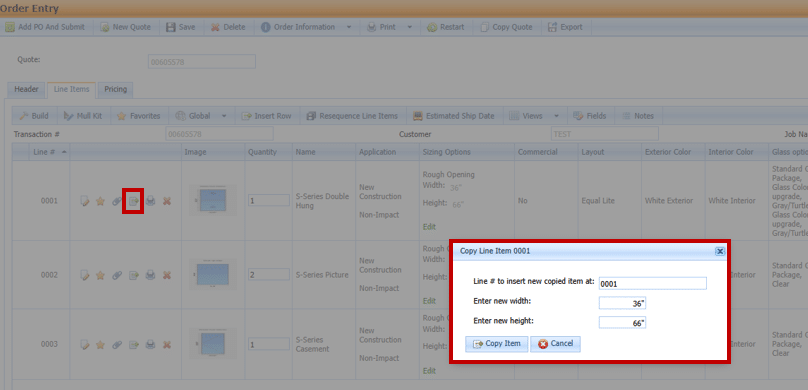
We’ve also enhanced the Copy Line Item functionality. Instead of copying only to the bottom of your quote, you can now insert the duplicated item exactly where you need it.
These improvements were made directly in response to user feedback. Try them out on your next quote and see how much easier it is to organize and edit line items.
Viwinco’s Commitment to Innovation
At Viwinco, we understand that efficiency and flexibility are key to your success. By continuously enhancing our features and tools, we aim to provide smarter, more efficient solutions that are built around your needs.
Our latest quoting enhancements—Resequencing Line Items, Inserting Lines, and Copying Line Items—are just the beginning. These updates reflect our ongoing mission to simplify your workflow and give you greater control over how you manage your quotes.
If you have any questions or run into any issues with these new features, our team is here to help. Don’t hesitate to contact us at 800-378-8635 or email helpdesk@viwinco.com for assistance!
If you have any questions or encounter any issues with these new features, our team is here to help. Please don’t hesitate to reach out to us at 800-378-8635 or email us at helpdesk@viwinco.com for assistance!